
Time Circuits Dashboard Clock1.3 - Google Play
You'll be able to see results in few seconds.
Publisher Description
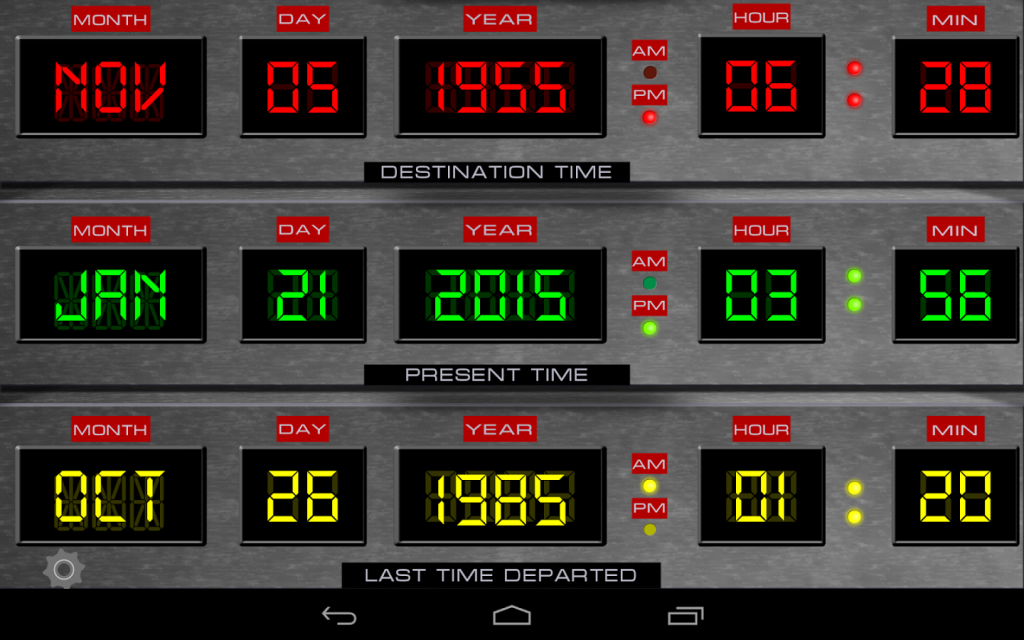
1.21 JIGAWATTS! Welcome time travelers! Fluxy88.com is proud to present our Time Circuits Dashboard Clock application that emulates the Time
Circuits LED control panel from the DeLorean Time Machine car that was in the “Back To The Future" movie!
Our Android app works for ALL ANDROID SCREEN SIZES! Wether you have a phone or a tablet, you can run our Time Circuits App!
Features of app:
- A real digital clock
- Beautiful Time Circuit display with custom graphics
- Change any of the times remotely by creating an account inside app and then you can login to Fluxy88.com to have the app update from the internet!
- Show only the current time, turn the other times displays on/off.
- Cool sound F/X to make your app even more fun!
Time Displays included are:
"DESTINATION TIME"
"PRESENT TIME"
"LAST TIME DEPARTED"
You can change any of these times by tapping on the the LABELS. For example, when you tap on the label "DESTINATION TIME", a popup window is displayed where you can tap the digits of the time you desire. Enter numbers like this: 08 for August, 05 for the fifth day of the month. All numbers must be two digits, 1 is 01, 9 is 09.
To change the dates remotely, do this:
-Create your free account inside the app. Then visit www.Fluxy88.com and select App Login. Change times at our website, then in the settings screen on main screen inside the app, and make sure the "UPDATE TIMES FROM FLUXY88.COM" is selected. Then every 60 seconds, the times on the app will be updated from the internet! You can use this option to change the dashboard to someones birth day date, anniversary, etc! all on
the fly!
Another fine app by DashyApps.com
About Time Circuits Dashboard Clock
The company that develops Time Circuits Dashboard Clock is Dash Technologies. The latest version released by its developer is 1.3.
To install Time Circuits Dashboard Clock on your Android device, just click the green Continue To App button above to start the installation process. The app is listed on our website since 2015-03-13 and was downloaded 0 times. We have already checked if the download link is safe, however for your own protection we recommend that you scan the downloaded app with your antivirus. Your antivirus may detect the Time Circuits Dashboard Clock as malware as malware if the download link to com.dashtechonline.tcf is broken.
How to install Time Circuits Dashboard Clock on your Android device:
- Click on the Continue To App button on our website. This will redirect you to Google Play.
- Once the Time Circuits Dashboard Clock is shown in the Google Play listing of your Android device, you can start its download and installation. Tap on the Install button located below the search bar and to the right of the app icon.
- A pop-up window with the permissions required by Time Circuits Dashboard Clock will be shown. Click on Accept to continue the process.
- Time Circuits Dashboard Clock will be downloaded onto your device, displaying a progress. Once the download completes, the installation will start and you'll get a notification after the installation is finished.
Program Details
System requirements
Download information
Pricing
Version History
version 1.3
posted on 2015-03-13
Auto rotate fixed. Now when you rotate the device to either landscape mode, normal or upside down, the app rotates it self accordingly to correct landscape orientation.
Disclaimer
Official Google Play Link
We do not host Time Circuits Dashboard Clock on our servers. We did not scan it for viruses, adware, spyware or other type of malware. This app is hosted by Google and passed their terms and conditions to be listed there. We recommend caution when installing it.
The Google Play link for Time Circuits Dashboard Clock is provided to you by apps112.com without any warranties, representations or guarantees of any kind, so access it at your own risk.
If you have questions regarding this particular app contact the publisher directly. For questions about the functionalities of apps112.com contact us.
